01 / Selected Works
School Meal Web Application
Overview
This system replaced a fully manual, error-prone monthly workflow at a primary school in Ghent. What used to take a secretary hours of form building, spreadsheet work, and manual ordering now runs in a matter of clicks.
It covers the complete meal lifecycle — from parents choosing meals on an interactive calendar, to the kitchen receiving accurate daily counts, to student billing being automatically posted in the school's administration system. Each part of the old workflow has a direct automated replacement.
The Problem
A Workflow Done Entirely By Hand
Every month, the school secretary built a new Google Form by hand — typing out the warm meal menu day by day from the supplier's website. Parents filled it in with their child's name and class, often with typos that the secretary then had to track down and correct manually when transferring responses to the spreadsheet. Every school morning, teachers had to log into Informat and register the meal choice for each student individually — a task repeated for every class, every single day.
Four People, Four Problems
Rebuilds the entire form every month from scratch and manually types in the supplier's menu. Transcribes parent responses into Excel by hand to calculate daily totals.
Types their child's name and class into a plain form field — with no validation. Any typo meant extra work for the secretary when copying responses into the spreadsheet.
Logs into Informat every morning to manually register the meal choice for each student. This was double work, as orders were already recorded in Excel but still had to be asked again in class.
Once per month, manually inputting orders on a separate page for each day on the catering platform — a tedious process.
The Solution
System at a Glance
Five automated integrations replaced five manual workflows
At the centre is the web application — the program itself. Around it: the school database that stores all meal choices and student data, the Informat school administration platform that handles student syncing and billing, the Chrome extension that bridges the two systems each morning, and the catering supplier that receives automated daily orders. Each node represents a process that used to be done by hand.
For Parents: Pick Meals on a Calendar
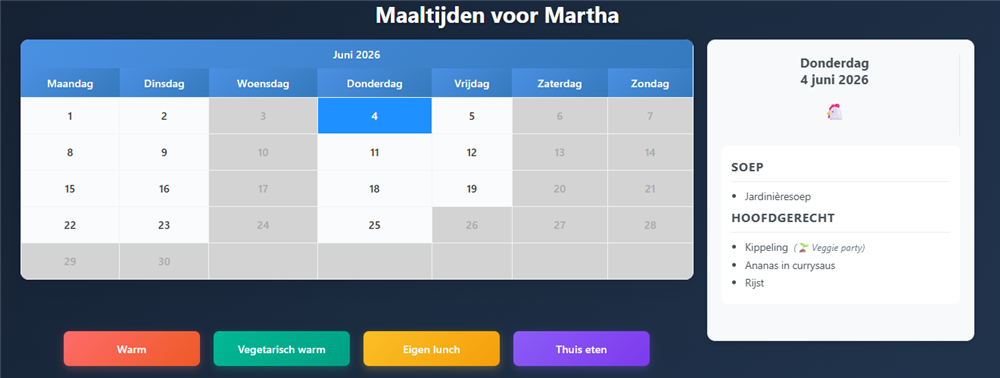
Parent meal calendar — meal selection & daily menu
Parents receive a five-character login code — printed as a sticker in their child's journal or sent by the school via email. They log in, open the calendar for the upcoming month, and tap each school day to select a warm meal, vegetarian option, packed lunch, or eating at home. Vacation days and class-specific field trips are automatically blocked. Fixed preferences can be set once and left unchanged year-round. That's the full interaction.
For the Secretary: A Single Dashboard
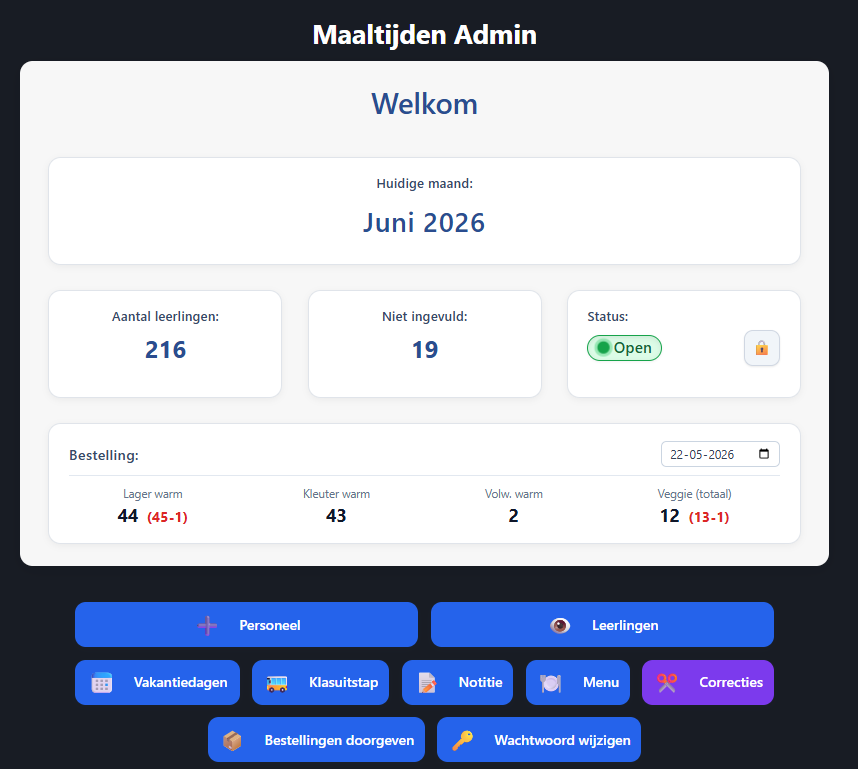
Admin dashboard — Juni 2026, orders open, absence corrections in red
The admin panel gives the secretary full control over the monthly cycle: syncing students from Informat, verifying the auto-scraped menu, blocking class-specific days, opening and closing the ordering period, and sending the confirmed order directly to the supplier. A reminder list shows which parents haven't submitted their choices yet, with their contact details ready to copy. Everything the secretary used to do manually across multiple tools is in one place.
The Daily Cafeteria List
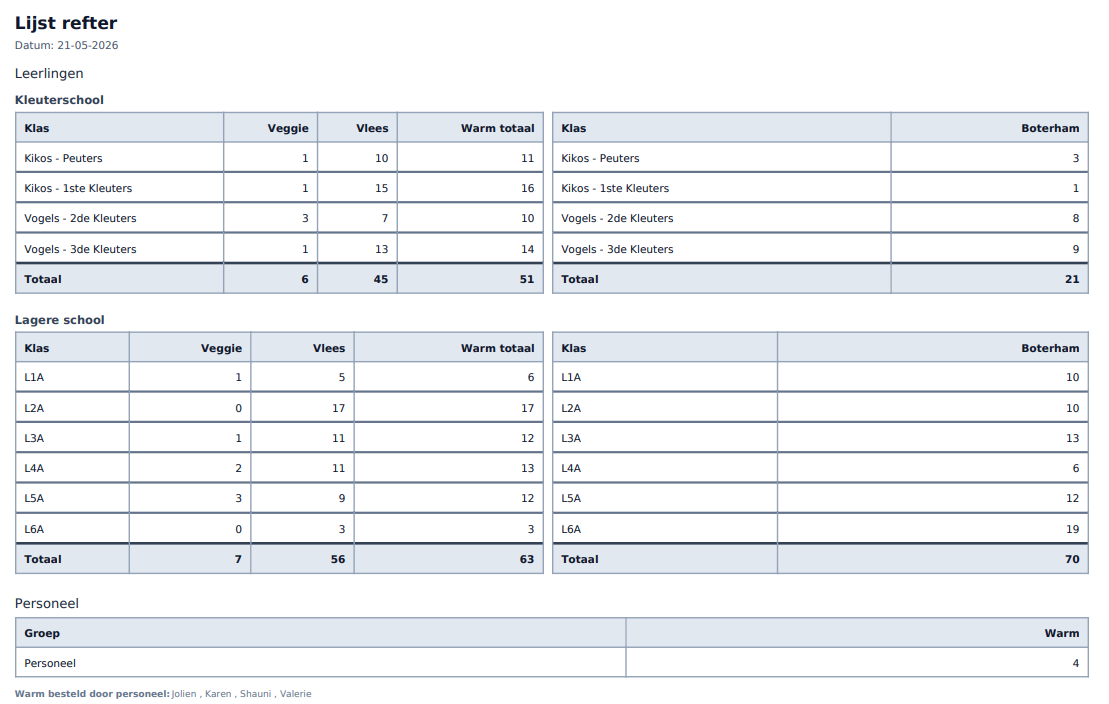
Lijst refter — warm meals & packed lunch counts per class
Every morning the kitchen needs a cafeteria list to set up tables separately for warm meal eaters and students bringing their own lunch. This happens regardless of any system. The browser extension integrates the daily billing into that same moment: when the secretary clicks to download the cafeteria list ("Refterlijst downloaden"), the extension reads that day's absences from Informat, registers each present student's meal choice, and skips absent students — because absent students don't get charged for a meal. The kitchen gets its list. The billing is done. No extra step added to the morning.
Sending Orders to the Supplier
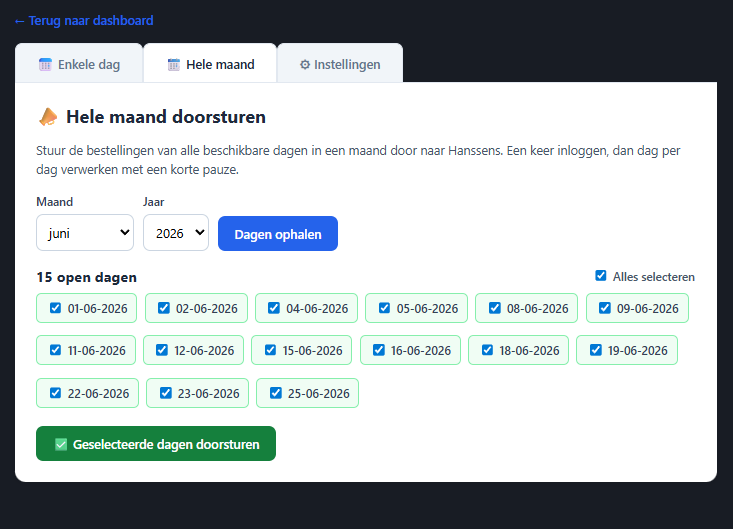
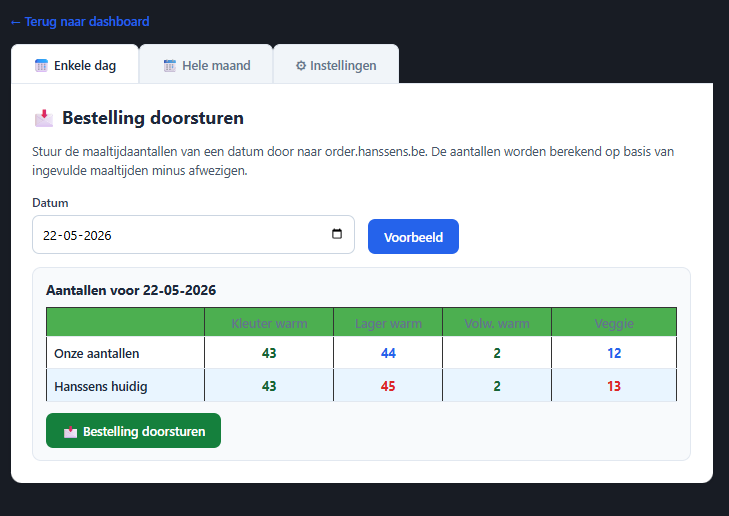
Monthly bulk order (left) & daily absence correction (right)
Orders are sent directly to the supplier (Hanssens) in two modes, both from the same screen. At the start of the month, the secretary fetches all open school days, selects them in bulk, and sends the full monthly order in one click. When absence numbers spike on a given day, the daily mode lets the secretary pick that date, see an instant side-by-side comparison between the school's current totals and what Hanssens already has on record, and send a corrected count for just that day. The counts are calculated automatically: confirmed meal choices minus absences. No phone call, no recalculation by hand.
How It's Built
Connected to the School's Own System
Student names, class lists, and parent contact details all live in Informat — the school administration platform used across hundreds of Belgian schools. Rather than maintaining a separate copy of this data, the meal system syncs directly with Informat via its official connection. New students are picked up at the start of the year; transfers and departures are handled in one sync. The secretary never enters a student name twice.
A Browser Extension for Daily Billing
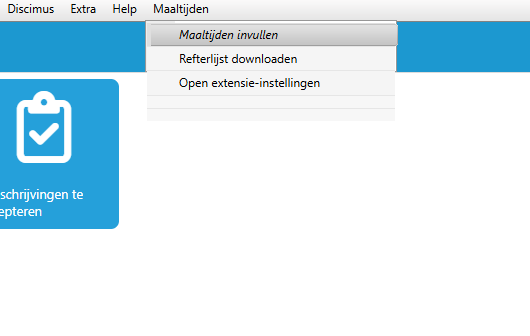
Maaltijden menu injected into Informat iBasis
The Chrome extension adds a "Maaltijden" menu directly into Informat's navigation bar — no separate tool to open, no switching tabs. Two actions live inside it. "Refterlijst downloaden" generates the daily cafeteria list: the extension reads which students are absent in Informat, excludes them from the count, and saves the absence data to the school database. "Maaltijden invullen" then uses that absence data to automate the meal registration in Informat's iRegistratie module — working through every student automatically, with a progress bar showing how far along it is. The entire school is processed in seconds.
Privacy and Data Isolation
Each school runs on its own isolated database, under its own web address. No data is shared between schools. Parent login codes are randomly generated and contain no personal information — a code like 'K7X2M' reveals nothing about the student it belongs to. Billing data is fetched from the school's own administration system in the moment it's needed and never stored outside of it.
Results
Before & After
Before
- A new Google Form built from scratch every month
- Menu typed in manually from supplier flyers
- Excel spreadsheets maintained by hand
- Orders placed by phone or email
- Teachers logging meals in Informat every morning
After
- Month opens with a single admin action
- Menu pulled automatically from the supplier
- No spreadsheets — daily counts always current
- Orders sent automatically at deadline
- Secretary handles the entire school in moments
What's Next
A full visual redesign and backend refactor are planned, moving toward a more structured architecture. The core workflows — parent calendar, kitchen counts, automated billing — remain the foundation everything is built on.
Connect